TL;DR
All Docker-in-Docker (dind) jobs of the pipeline now run on autoscaling AKS runners instead of the few docker-tagged VM runners. Each job runs dind as a GitLab service in a privileged pod. No node changes, no extra VMs, and the CI change was mostly one tag.
The problem was queueing. The first job of the pipeline, build-image, needs Docker, so every pipeline waited for a free docker runner before anything else could start. The test containers queued behind it the same way.
Options I weighed
I chose privileged dind because it was the only option that needed neither node changes nor new infrastructure. Its cost is security, handled with a dedicated pool (see the last section).
| Option | What it is | Why not / why |
|---|---|---|
Privileged dind on the K8s executor | privileged = true on a runner; dind runs as a job service, as it already did on the VM runners | Chosen. One runner setting plus a tag change; my .docker-run setup worked unchanged |
Rootless dind (docker:*-dind-rootless) | dockerd as a non-root user inside the pod | Still needs privileged in practice, and adds uid and file-ownership trouble with the bind-mounted build dir |
| Sysbox runtime | A container runtime that lets unprivileged pods run dockerd | Officially supported only up to Kubernetes 1.35 (I run 1.36.x); the installer changes the node’s containerd config, and on containerd 2.x that needs a manual fix on every node |
| docker-autoscaler on an Azure VM Scale Set | GitLab Runner creates a throwaway VM per job and runs the normal Docker executor there | No CI changes and no privileged pods, but a VM image, scale set, SSH keys, identity, a blob cache and a third runner release: too much setup |
Longer term the stack moves from Docker Compose to a Helm chart. CI can then install the chart into a throwaway namespace per job and needs no Docker at all.
How dind runs on the Kubernetes executor
The job scripts didn’t change, because everything dind relies on is shared inside the job’s pod. The Docker executor gave each job a dind container linked to the build container. The Kubernetes executor puts both into one pod instead.
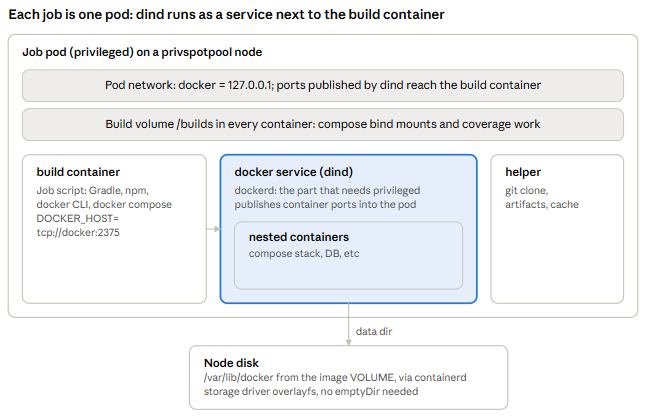
The build container talks to dockerd over tcp://docker:2375. Containers started inside dind publish their ports into the shared pod network, and they can bind-mount build-directory paths because dind sees the same /builds volume. The one new race: the build container can start before dockerd listens, hence the wait in .docker-run.
Runner configuration
The runner needs one things beyond my normal K8s runner: privileged = true
[[runners]]
  [runners.kubernetes]
    privileged = true
Things to check on the cluster before the first job:
- Pod Security Admission: if the runner’s namespace enforces a policy, it needs
pod-security.kubernetes.io/enforce=privileged. - Azure Policy: if “Kubernetes cluster should not allow privileged containers” is assigned, exempt that namespace.
- No emptyDir for
/var/lib/docker. containerd creates the dind image’sVOLUME /var/lib/dockeron the node’s disk, so dockerd getsoverlayfs. - Separate ServiceAccount name. If two runner releases create a ServiceAccount with the same name, Helm refuses the second install.
CI changes
All jobs extend .docker-run in .gitlab-ci.yml, so most of the change lives there.
.docker-run:
  before_script:
    # the build container can start before dockerd in the service listens
    - for index in $(seq 1 120); do
        docker info >/dev/null 2>&1 && break;
        if [ $index -eq 120 ]; then echo 'dockerd never came up'; exit 1; fi;
        sleep 1;
      done
    # vfs means /var/lib/docker sits on the container's overlay, not on the node's disk
    - "docker info --format 'Storage driver: {{.Driver}}'"
    - mkdir -p $DOCKER_CONFIG
    - echo "$DOCKER_CONFIG_BASE64" | base64 -d >$DOCKER_CONFIG/config.json
  services: [...]   # unchanged
  # the dind service needs a privileged pod
  tags:
- dind-aks- Tag:
.docker-runused to carrytags: [docker]. It now carriesdind-aks. - dockerd wait: the Docker executor waits for services itself. On Kubernetes the build container can start first, so the job polls
docker infofor up to 2 minutes. - Storage driver line: one log line that confirms dockerd is on the node’s disk (
overlayfs, notvfs). - Memory per job: each job sets
KUBERNETES_MEMORY_*for the build container andKUBERNETES_SERVICE_MEMORY_*for dind (values below).
Unchanged and still working: DOCKER_HOST: tcp://docker:2375
What the PoC showed
Everything went green, and the memory I first reserved turned out to be far more than needed. I started with build-image alone, then the other image builds, then the tests.
build-image, first run on Kubernetes:
| Step | Result |
|---|---|
| Pod scheduling | About 10 s Pending on an existing Spot node; the privileged pod was not blocked |
| dockerd ready | Before the first docker info check |
| Storage driver | overlayfs |
| BuildKit inside dind | moby/buildkit:v0.30.0 pulled via the ACR mirror in 4.5 s, booted in 9.6 s |
| Whole script | 22 s on the “Reusing” path, no queue wait |
Security and next steps
A privileged container can take over the node it runs on, so I limit who gets one and which nodes it can reach. The Kubernetes executor has no per-job opt-in: privileged = true applies to every container of every job on that runner.
- Create
privspotpool: a tainted Spot pool for privileged pods only. Bigger nodes than 16 GB would fit more test pods per node. - Install the separate runner release with
privileged = true, the service overwrite limits,privspotpoolaffinity and the matching tolerations. - Register it in GitLab with the
dind-akstag.
Bear in mind: a Spot eviction restarts a job from the beginning through retry: runner_system_failure, which costs the most for the 30-minute test-compose. The runner’s job slots (concurrent × replicas) are now the likelier limit, shared with every other project on the runner.